Technical Hiring
How to Find Developers on GitHub: A Recruiter's Guide
You know GitHub can surface technical candidates. The harder part is turning that into a repeatable workflow: what to search, how to narrow results, and when a profile is worth a closer look. This guide is a practical recruiter playbook for finding developers on GitHub - search syntax, three discovery workflows, and a short profile triage routine you can run in minutes.
For the broader context - what GitHub can and cannot tell you about a developer - start with GitHub Candidate Sourcing: How Recruiters Can Find Technical Talent. This article focuses on how to search and shortlist. Finding the profile is only the first step. The next step is understanding the public technical evidence behind it.
What you need before searching GitHub
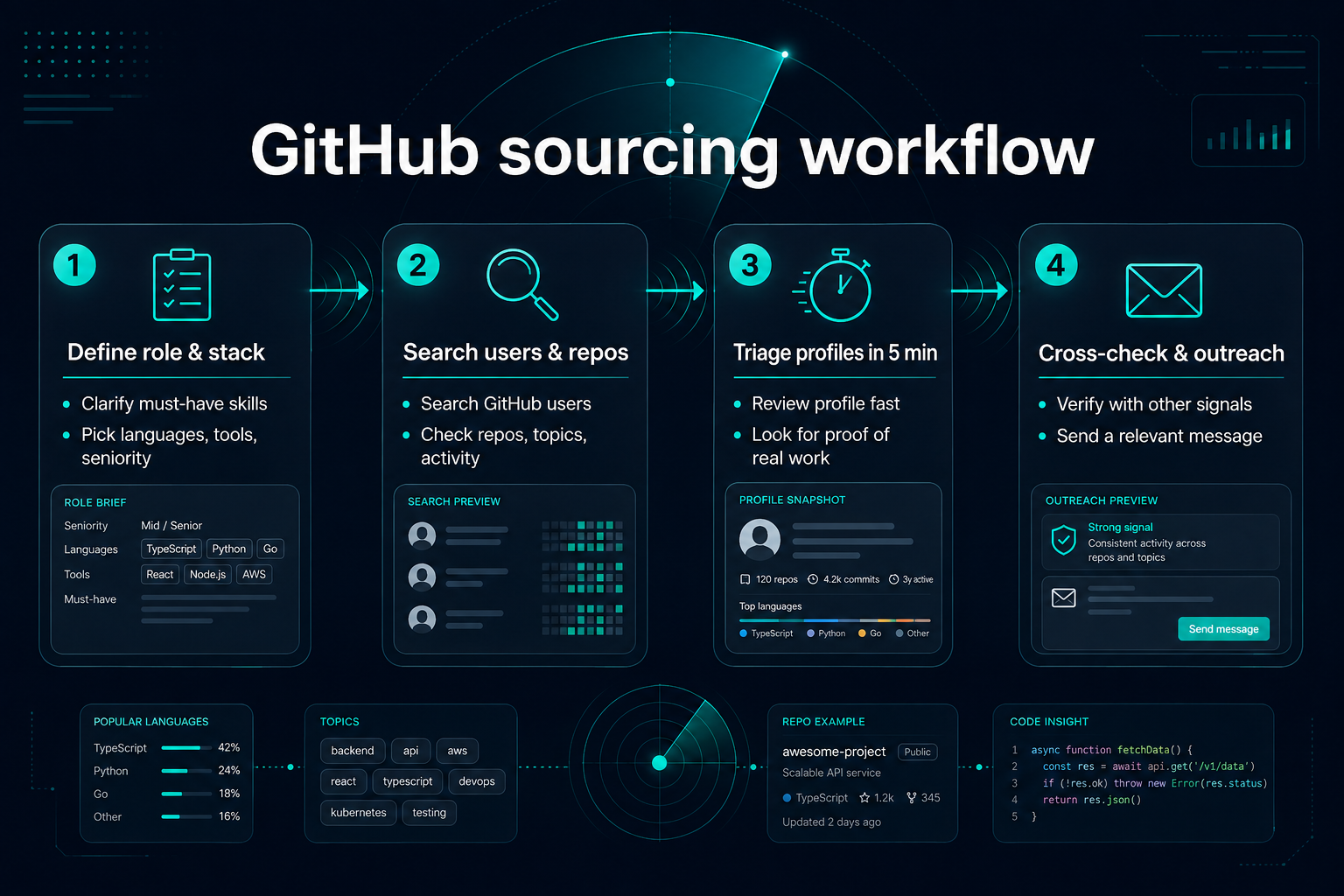
GitHub search works best when you start with a clear role brief. Vague searches produce noisy results; specific searches surface people whose public work actually relates to the hire.
Must-have technologies. List the languages, frameworks, or platforms that matter for day-one work. Example: TypeScript, React, Node.js for a full-stack role - not every technology the team uses eventually.
Nice-to-have signals. Open-source participation, documentation habits, or experience with a specific ecosystem (Kubernetes, AWS CDK, PyTorch). These help prioritize who to look at more closely; they should not be hard filters unless the role truly requires them.
Location or timezone (optional). GitHub profile location is free text and often outdated. Use it as a hint, not a guarantee. See GitHub user search qualifiers for syntax.
What you will not learn from GitHub alone. Public activity does not show job-search intent, seniority in private employment, or team fit. Plan to combine GitHub with LinkedIn, Stack Overflow profiles, and direct conversation.
Write down three to five search terms a developer in this role might use on repos or profiles - library names, stack keywords, or project types - before opening GitHub search.
GitHub search basics for recruiters
GitHub separates search into users, repositories, and code. Recruiters doing developer sourcing usually move between all three: find relevant repos, inspect contributors, then open user profiles.
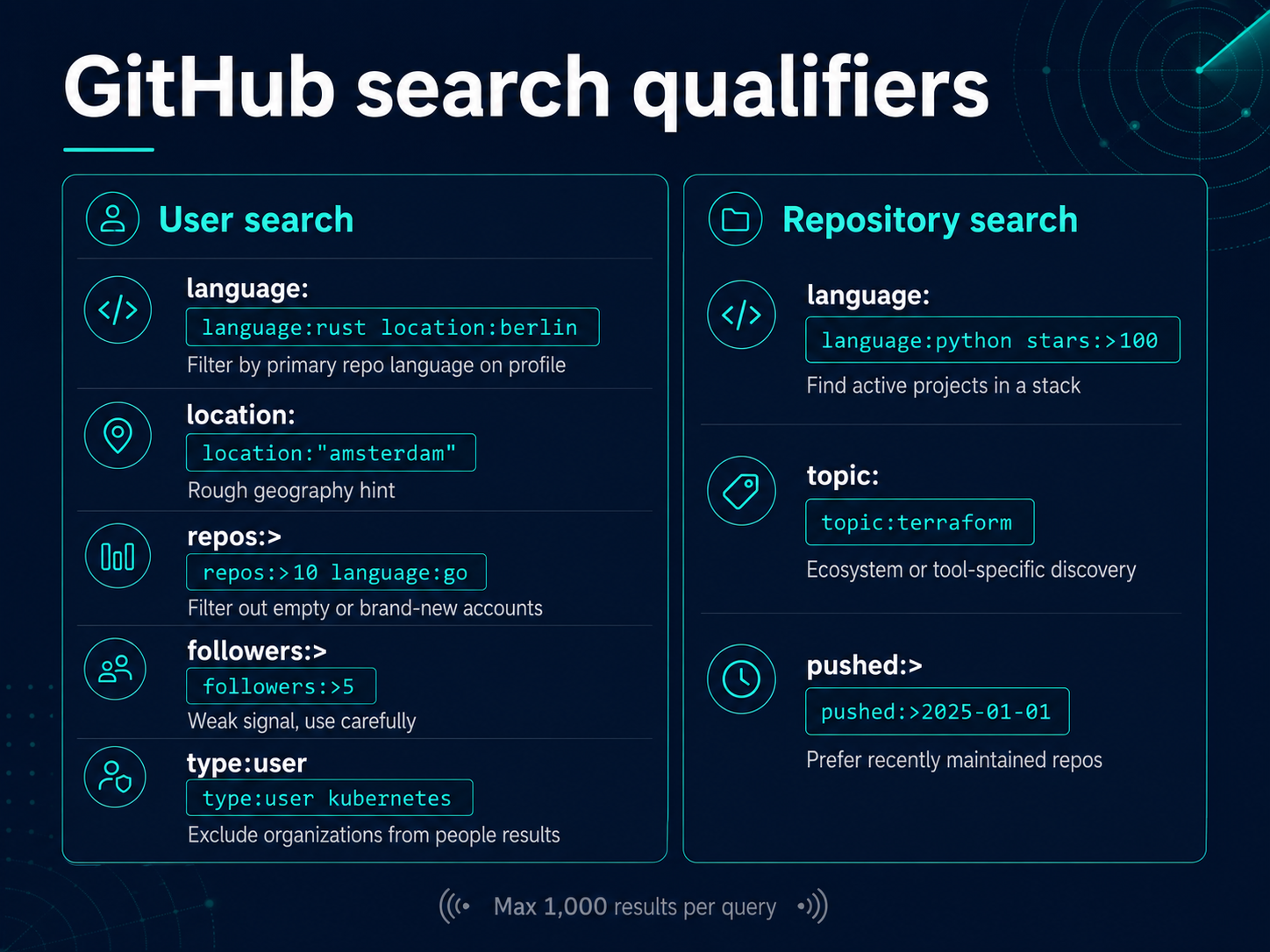
User search finds people. Common qualifiers from GitHub's documentation:
| Qualifier | Example | Recruiter use |
|---|---|---|
language: | language:rust location:berlin | Filter by primary repo language on profile |
location: | location:"amsterdam" | Rough geography hint |
repos:> | repos:>10 language:go | Filter out empty or brand-new accounts |
followers:> | followers:>5 | Weak signal; use carefully |
type:user | type:user kubernetes | Exclude organizations from people results |
Repository search finds projects. Useful qualifiers:
| Qualifier | Example | Recruiter use |
|---|---|---|
language: | language:python stars:>100 | Find active projects in a stack |
topic: | topic:terraform | Ecosystem or tool-specific discovery |
pushed:> | pushed:>2025-01-01 | Prefer recently maintained repos |
Code search finds snippets inside repositories. Powerful for niche libraries, but GitHub limits code search and it requires more technical context to interpret. Many recruiters rely on user and repo search first.
Result limits. GitHub returns at most 1,000 results per search query. Narrow with additional qualifiers rather than scrolling endlessly.
Save your queries. Keep a spreadsheet or doc of searches that worked for each role type. Reuse and refine instead of starting from scratch every time.
Workflow: find candidates by technology and location
This is the default path when you have a stack and optional geography, but no target repository yet.
Step 1 - Start with user search. Example for a backend role in the Netherlands:
Adjust language and location for your role. Try city, country, and region variants - profile location strings are inconsistent.
Step 2 - Open promising profiles. Scan pinned repositories, contribution graph recency, and README quality. Skip accounts with only forks and no original work unless a fork shows meaningful changes.
Step 3 - Validate stack depth. Click into one or two owned repos. Read the README, check dependency files, and skim recent commits. You are looking for relevance, not perfection.
Step 4 - Cross-check elsewhere. A quiet GitHub profile does not mean a weak engineer. Check LinkedIn or Stack Overflow when GitHub evidence is thin.
Step 5 - Shortlist with notes. Record username, why they matched, which repo you reviewed, and open questions. You will need this when handing off to a hiring manager or drafting outreach.
Repeat with variations: swap language: values, add followers: or repos: thresholds, or remove location to widen the pool.
Workflow: find contributors to a repository or ecosystem
Use this when you know a canonical open-source project, vendor SDK, or internal-adjacent public repo that reflects your stack.
Step 1 - Identify anchor repositories. Examples: a popular framework in your stack, a tool your team uses, or a company open-source org relevant to the role.
Step 2 - Open the contributors page. GitHub lists people who contributed commits to the default branch. Sort mentally by recency and volume - but read context before assuming seniority.
Step 3 - Filter for relevance. A contributor with one documentation fix is different from a maintainer with months of reviews. Open their profile and other repos.
Step 4 - Expand through organizations. Company org pages and maintainer teams can reveal adjacent engineers working in public on the same ecosystem.
Step 5 - Watch employer boundaries. Many contributors use personal accounts for OSS and employer accounts for day job work you cannot link. Do not assume every GitHub username maps to a current employer.
This workflow often finds strong engineers who never optimized a LinkedIn profile - one reason teams pair GitHub with broader developer discovery.
Workflow: use topics and awesome lists for niche stacks
Niche stacks do not always surface in generic language: searches. Topics and curated lists help.
Step 1 - Search repositories by topic. Example: topic:observability language:go pushed:>2025-06-01. GitHub repository topics tag ecosystem membership.
Step 2 - Find awesome-list or curated repos. Search awesome kubernetes or awesome rust for community-maintained link collections. Inspect authors and frequent contributors to those lists.
Step 3 - Trace dependencies and stars. From a relevant repo, check who starred, forked with meaningful changes, or opened substantive issues and pull requests.
Step 4 - Narrow to people. Move from repo → contributors → user profile using the triage checklist below.
Topics and lists are discovery starting points, not proof of hireability. Always read the actual work.
How to read a GitHub profile in 5 minutes
You do not need to audit every line of code for initial research. Use a consistent triage pass so different recruiters on your team apply similar judgment.
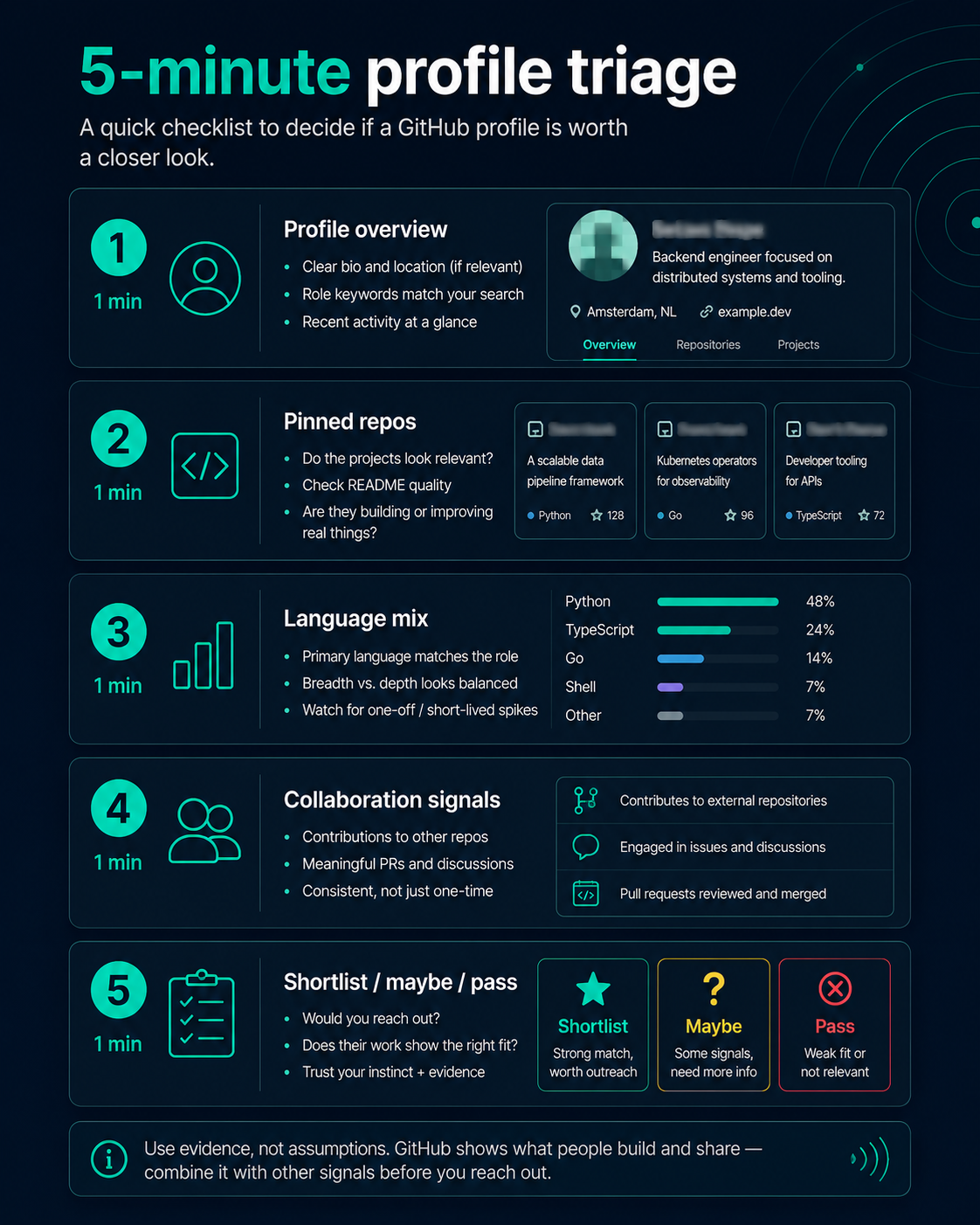
Minute 1 - Profile overview. Read bio, pinned repositories, and contribution graph for the last twelve months. Note gaps without treating them as automatic disqualifiers.
Minute 2 - Pinned repositories. Do they relate to your role? Are READMEs maintained? Is there original work or only empty forks?
Minute 3 - Language and repo mix. Does the public language breakdown align with your stack? Remember private work may not appear.
Minute 4 - Collaboration signals. Scan recent issues, pull requests, and review comments on owned or contributed repos. Tone and clarity matter for team fit hints.
Minute 5 - Decision. Tag the profile: shortlist, maybe (needs cross-source check), or pass (with a one-line reason). Avoid pass/fail based on stars or green-square count alone.
Finding the profile is only the first step. The next step is understanding the public technical evidence behind it. Keep this triage as a shortlist pass. For deeper interpretation - and common over-read mistakes - see Reading a GitHub Profile as a Recruitment Signal and the pillar section on what GitHub can and cannot tell a recruiter.
When to move from GitHub to outreach
GitHub is for discovery and research, not for assuming interest. Move to outreach when:
You have role-relevant evidence. At least one concrete data point - a repo, contribution, or discussion - you can reference without exaggerating.
Cross-source check is done (or intentionally skipped with eyes open). LinkedIn, Stack Overflow, or internal notes filled gaps that matter for your process.
Your hiring manager agrees the stack match is plausible. GitHub triage is sourcer input, not a final hire decision.
You can write a specific first line. "I saw your work on [repo/topic]" beats generic InMail. If you cannot name the evidence, you are not ready to outreach.
Do not outreach solely because someone has high commit volume or many followers. Activity shows engagement with technical work, not availability.
Common mistakes in GitHub search
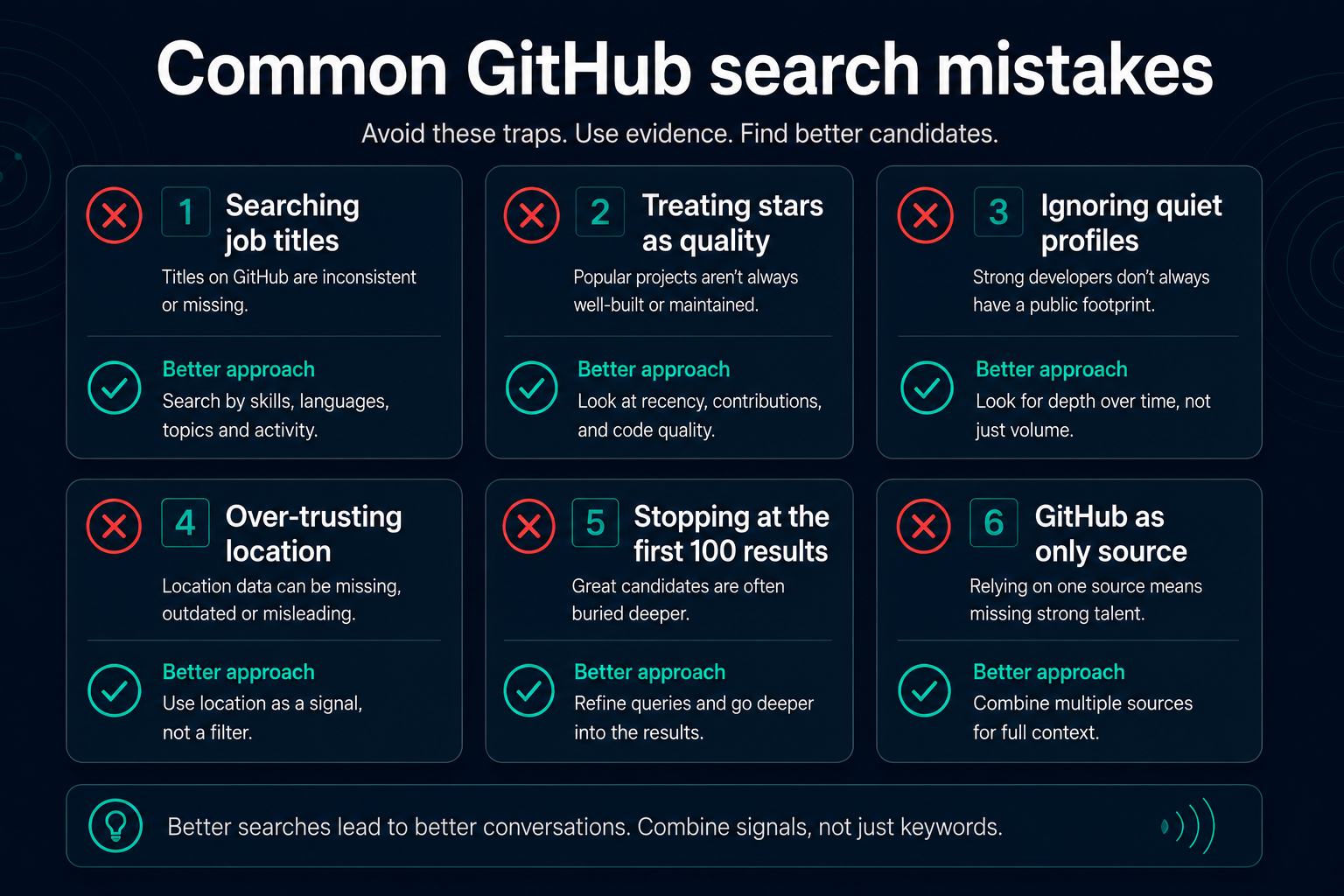
Searching job titles on GitHub. Developers rarely label themselves "Senior Backend Engineer." Search technologies, repos, and contributions instead.
Treating stars as candidate quality. Stars reflect project popularity, not individual level.
Ignoring inactive profiles. Strong engineers often have quiet GitHub accounts because work is private. Absence of public activity is missing evidence, not proof of weakness.
Over-trusting location filters. "San Francisco" in a profile may be aspirational or outdated.
Stopping at the first 100 results. Refine qualifiers; GitHub caps at 1,000 results per query but most teams never exhaust well-narrowed searches.
Using GitHub as the only source. Combine with Stack Overflow, professional history, and interviews.
Confusing employer org membership with individual candidates. Org repos show company work, not always who you should contact for a role elsewhere.
How Sonar Air supports GitHub sourcing workflows
Manual GitHub search works for focused hires. It becomes slow when your team runs many technical roles, repeats similar stack searches, or needs consistent evidence packets for hiring managers.
Sonar Air is a technical evidence research and candidate discovery platform for recruiters - the technical evidence layer alongside your recruiting stack. It helps recruiters discover technical candidates through public technical evidence, including GitHub activity, alongside Stack Overflow, Hacker News, Kaggle, and technical blogs. Recruiters define role profiles, run evidence-backed scans, and review matches with links to the public work behind each recommendation - keeping humans in the review loop before outreach.
Sonar Air is not a replacement for reading profiles yourself when context matters. It reduces repetitive discovery work so recruiters spend more time on judgment and conversation. A Free plan (€0) covers one role and one scan per month; access is invite-only while self-serve billing is being tested. Agents that draft outreach and sourcing strategy are in beta.
For a named free starting stack — GitHub search, public code search, and platform options — see Best GitHub Candidate Sourcing Tools.
Learn more in GitHub candidate sourcing overview, how to evaluate GitHub sourcing tools, how Sonar Air works, and supported data sources.
Frequently asked questions
How do recruiters find developers on GitHub?
Recruiters find developers on GitHub by searching users with language and location qualifiers, inspecting contributors to relevant repositories, and tracing ecosystem topics or curated lists. They shortlist profiles whose public repos and recent activity match the role, then cross-check with LinkedIn, Stack Overflow, or direct outreach.
What is the best GitHub search syntax for recruiters?
Start with user search: combine language:, optional location:, and repos:> to filter empty accounts. For repo-centric discovery, use topic:, language:, and pushed:> to find maintained projects, then open contributor lists. GitHub documents all qualifiers.
Can you search GitHub by programming language and location?
Yes. User search supports language: based on repository language statistics on a profile and location: based on the free-text location field. Both are imperfect: language stats omit private repos; location is self-reported and unverified.
How do you know if a GitHub profile is worth contacting?
Worth contacting when pinned or recent repositories relate to your stack, collaboration in issues or pull requests looks substantive, and you can cite specific public work in outreach. Not worth contacting on GitHub evidence alone when activity is unrelated, purely forked noise, or too stale to infer current skills - unless other sources compensate.
Do you need to be technical to source on GitHub?
You need enough context to judge relevance and recency - READMEs, project descriptions, and discussion tone often suffice. You do not need to review every commit. When stacks are deeply niche, pair with an engineer for a second opinion on repo quality.
Is GitHub search free for recruiters?
Searching and viewing public profiles on GitHub is free. GitHub's API has rate limits for automated workflows. Third-party sourcing platforms may add cost but can combine GitHub with other public sources and repeatable role-based searches. See Best GitHub Candidate Sourcing Tools for Recruiters in 2026 for how to evaluate them.
How many GitHub search results can you get?
GitHub returns at most 1,000 results per search query. Narrow with additional qualifiers rather than expecting exhaustive lists from broad searches.
What should you do after finding a developer on GitHub?
Document why they matched, cross-check LinkedIn or Stack Overflow, confirm stack fit with your hiring process, then write evidence-specific outreach. Treat the profile as research input until conversation and screening validate fit.
Final takeaway
Finding developers on GitHub is a workflow, not a one-off search. Define the role, use user and repository qualifiers deliberately, run contributor and topic-based discovery when stacks are niche, and triage profiles in minutes with consistent criteria.
Discovery comes first. Then review the public technical evidence, then decide whether conversation is warranted. GitHub works best alongside other public evidence and professional history - not as a standalone scorecard. For the full picture of what GitHub fits in technical recruiting, read GitHub Candidate Sourcing: How Recruiters Can Find Technical Talent. For reading public work as hiring signal without over-interpreting it, see Reading a GitHub Profile as a Recruitment Signal.
Sonar Air team
Writes about evidence-based technical recruiting and multi-platform developer sourcing at Sonar Air.
About Sonar AirNext in the series
Best GitHub Candidate Sourcing Tools for Recruiters in 2026 →Back to blog